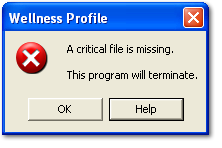
You just received the above message. Why did you get it and what do you do about it?
A critical file is missing because:
-
It was deleted (intentionally or unintentionally)
-
It is corrupted
-
The program never installed correctly in which case the program never got beyond this message.
Solution:
-
If this version of the program worked previously, then
-
Make a copy of your data (the file <WLP700b.mdb> located in the same folder as the program) and place it somewhere other than the folder containing the program.
-
Also make a copy of the file <CoSetB.dat> (located in the same folder as the program) and place it somewhere other than the folder containing the program.
-
Reinstall the program
-
Move the previous backup copy of <WLP700b.mdb> and <CoSetB.dat> into the folder containing the newly installed program.
-
Overwrite the files when asked.
-
B. If this is a new install and the program never worked, then
-
uninstall the program
-
and reinstall it.
If after doing either A. or B. above and the program still gives you this message
contact us.