|
 Picture
Not a preview of the document but a picture of the paper orientation and size scaled down to view the relative relationship befween height and width.
| |
 Paper Size
Use the drop down list to select a paper size. Usually nothing needs to be done here since most printing is done on U.S. Letter size paper.
| |
 Paper Source
Use the drop down list if it is desired to select a different paper tray than the default.
| |
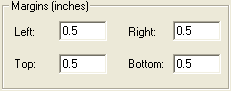
 Margins
Change any of the 4 margins if desired in this area of the Page Setup window.
| |
 Portrait option
Select the desired page orientation.
| |
 Printer... button
Select a printer. Usually nothing needs to be done here if the default printer is to be used.
| |
 OK button
| |
 Cancel button
Click the Cancel button to return to the previous window without printing or previewing anything.
| |
|
|