|
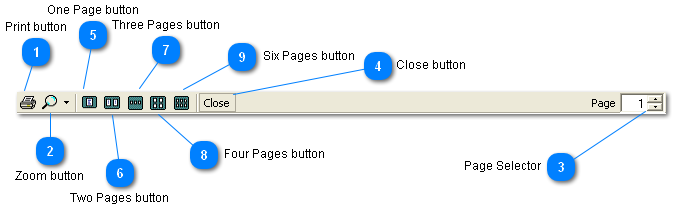
 Print button
Print the displayed document
| |
 Zoom button
Change the Zoom level for viewing the document.
Click then magnifying to select Auto.
Click the drop down arrow to choose from a number of Zoom choices.
| |
 Page Selector
Shows the number of the currently displayed page.
Click the up arrow to display a higher numbered page.
Click the down arrow to display a lower numbered page.
Highlight the page number and type your own number to go directly to that page.
| |
 Close button
Closes the Preview window.
| |
 One Page button
Display one page
| |
 Two Pages button
Display two pages
| |
 Three Pages button
Display three pages
| |
 Four Pages button
Display four pages
| |
 Six Pages button
Display six pages
| |
|
|