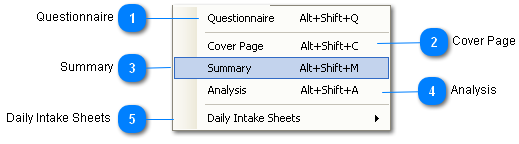
(If the Print Module was not purchased this menu is a disabled and invisible.)
(Summary is the selected item in this image of the Send Documents Menu.)
This is a brand new feature with the introduction of version 7. Users of the program have been asking for this for a long time.
Hopefully it is fairly self-explanatory what each of the menu items does.
What is important.
The contents of the
Send eMail window that appears after clicking on any of the first 4 items is customized for the client and the document.
|
Note:
|
There is no provision to send the Supplement Guide since it is something that the client should never see.
|
 Questionnaire
Prepares an email to send the Questionnaire to the current client displayed in the Data Entry window.
This menu item is not available if there is no first and last name displayed in the Data Entry window.
|
|
 Cover Page
Prepares an email to send to the client displayed in the Data Entry window a customized Cover Page for that client.
|
|
 Summary
Prepares an email to send to the client displayed in the Data Entry window a customized Summary page for that client.
|
|
 Analysis
Prepares an email to send to the client displayed in the Data Entry window a customized Analysis for that client.
|
|
 Daily Intake Sheets
Instead of opening the document the program prepares an email to the client with the selected Daily Intake Sheet attached.
|
|