|
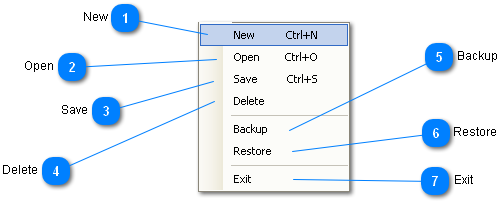
(New is the selected item in this image of the File Menu.)
 New
Creates a new Data Record with all fields blank.
Can also be accomplished by holding down the Ctrl (Control) key while pressing the N key (Ctrl+N).
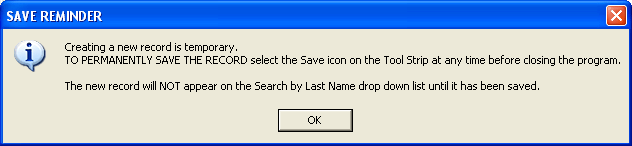
Before the blank record is displayed a popup message, as seen below, is displayed to remind the user of some important points about the new record.
This blank record is ready for user input.
| |
 Open
Can also be accomplished by holding down the Ctrl (Control) key while pressing the O key (Ctrl+O).
The user can also use the Search by Last Name drop down list without ever going to the File menu and selecting Open.
| |
 Save
Saves the currently displayed record.
Can also be accomplished by holding down the Ctrl (Control) key while pressing the S key (Ctrl+S).
| |
 Delete
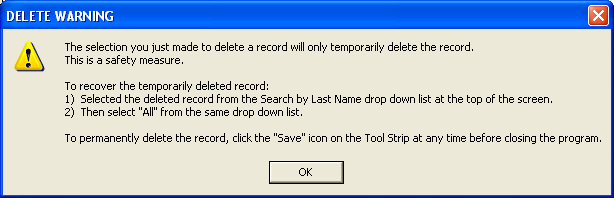
Temporarily deletes the currently displayed record. Does the same thing as the Delete icon on the Toolbar.
A popup message, as seen below, explains why the delete is temporary and how to delete a record permanently.
| |
 Backup
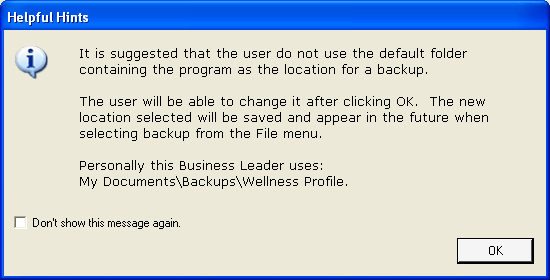
Upon clicking Backup under the File menu a Helpful Hint message will appear like the one shown below.
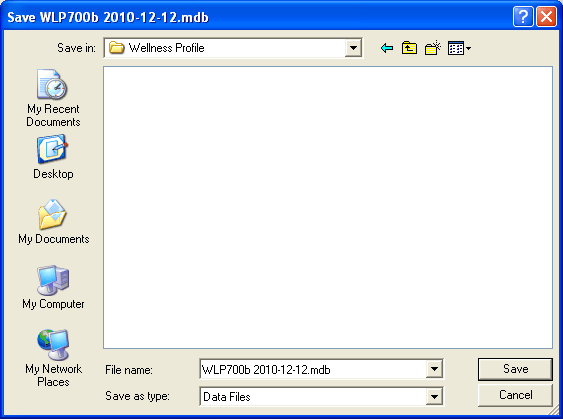
After clicking the OK button in the Helpful Hint message a Dialog box (seen below) appears where the user can select the location to save the backup. Or the user can click the Cancel button in the Dialog box and no backup will be made.
|
Note:
|
The file to be backed up has the date added to it automatically.
This allows the user to select, by date, from the list of all backups created when selecting Restore from the File menu |
| |
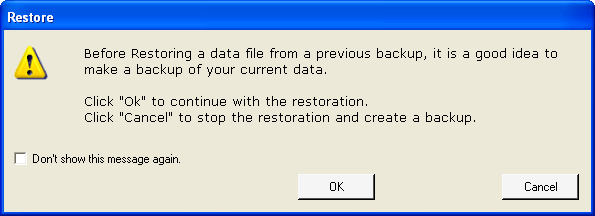
 Restore
| |
 Exit
Closes all windows and exits the program.
| |
|
|